‘Request’ button
Created by Emily Sommers on March 6, 2026
Background
In the spring of 2024, ahead of the launch of the Special Collections Access system, a request button was added to the right sidebar, above the Finding Aid button, to enable users to more easily request items.
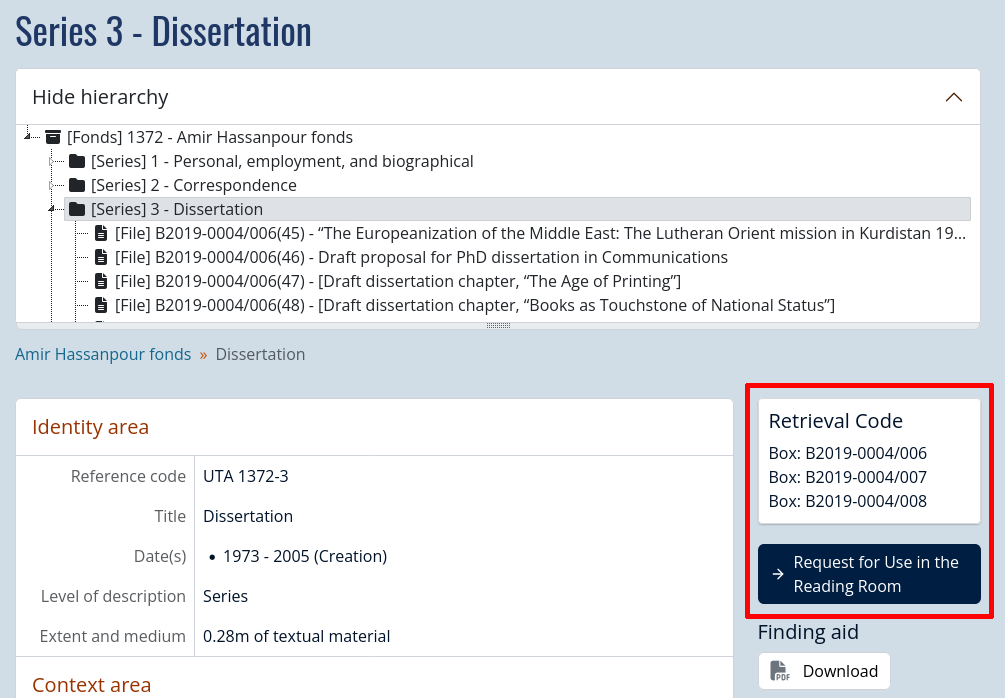
By default, the button will only display when there is a physical container attached to the archival description.
- For documentation on adding physical containers to archival descriptions, see the Physical Storage module documentation pages and the Policy on the Physical Storage Module.
By default, the button will display “Request this material” with a link to https://discoverarchives.library.utoronto.ca/index.php/contact-us
The button text and link can be customized per repository by ITS by submitting a ticket to discoverarchives@library.utoronto.ca. This work may take 1-4 weeks depending on staff availability.
For repositories using the Special Collections Access system, the link should be your specific repository’s request form. The link will bring users directly to your form in Special Collections Access but will not auto populate the form. This functionality is not available at this time.
Special Collections Access form link example
https://aeon.library.utoronto.ca/Logon?action=10&form=20&Value=GenericRequestUTARMS
- The parameters in this link will ask the user to login or register, and after doing so, will redirect them to the webform.
Examples of the button in use
-
Music Library: https://discoverarchives.library.utoronto.ca/index.php/otufm87-ruby-mercer
-
UTARMS: https://discoverarchives.library.utoronto.ca/index.php/arthur-fry-fonds
-
UTM Library, Archives & Special Collections: https://discoverarchives.library.utoronto.ca/index.php/play-scripts